Decided to try to go with pure PostgreSQL for this one.
Part 1 was easy. You are given a list of available ingredient id’s from the elven cafeteria, and a list of ranges of “fresh” ingredients. Determine which available ingredients are fresh.
I made 2 tables, fresh_ingredients and available_ingredients, and from there it’s a simple query:
SELECT ai.* FROM available_ingredients ai WHERE
(SELECT COUNT(*) FROM fresh_ingredients
WHERE ingredient_id_range_min <= ai.ingredient_id
AND ingredient_id_range_max >= ai.ingredient_id) > 0
Part 2 asks you to disregard the available ingredients and get a count of all fresh ingredients from the given ranges. Also a simple query, right?
SELECT COUNT(DISTINCT gs.ingredient_id)
FROM GENERATE_SERIES(
(SELECT MIN(ingredient_id_range_min) FROM fresh_ingredients),
(SELECT MAX(ingredient_id_range_max) FROM fresh_ingredients)) as gs(ingredient_id)
WHERE (SELECT COUNT(*) FROM fresh_ingredients
WHERE ingredient_id_range_min <= gs.ingredient_id
AND ingredient_id_range_max >= gs.ingredient_id) > 0
Wrong!
Theoretically, that query can solve it. Except the ranges they give you are things like: 377649615919740 – 379699191722247, which gives you 2,049,575,802,507 fresh id’s. For one range.
I ran out of disk space on my 1TB laptop.
NEW PLAN: Need to order the ranges starting with the lowest starting id, loop through each one and merge them. Also, have a calculate column figure out the difference in each range (we don’t care about each ingredient, just how many).
ALTER TABLE fresh_ingredients_merged
ADD COLUMN ingredient_id_range_diff BIGINT
GENERATED ALWAYS AS (ingredient_id_range_max - ingredient_id_range_min + 1) STORED;
Now the “merging” logic. This is what we’re aiming for:
-- Loop through ranges
-- If the new start number falls within an existing range,
-- Alter the existing end number to be the max of the new end number and existing
--
-- If the new end number falls within an existing range,
-- Alter the existing start number to be the min of the new start number and existing
--
-- if the new start AND end number fall within existing range, do nothing
--
-- if neither new start or end numbers fall within existing range, add a new row
Here’s the final working query. PS. I can’t fucking believe this worked. PPS. I know this could have been much simpler in Python or something but this is the life we’ve chosen!
DO
$do$
DECLARE
  i record;
BEGIN
  FOR i IN SELECT * FROM fresh_ingredients ORDER BY ingredient_id_range_min LOOP
	-- If the new start number falls within an existing range,
	-- Alter the existing end number to be the max of the new end number and existing
	--
	-- If the new end number falls within an existing range,
	-- Alter the existing start number to be the min of the new start number and existing
	--
	--   if the new start AND end number fall within existing range, do nothing
	--
	-- if neither new start or end numbers fall within existing range, add a new row
	IF (SELECT COUNT(*) FROM fresh_ingredients_merged fim
		WHERE fim.ingredient_id_range_min <= i.ingredient_id_range_min
		AND fim.ingredient_id_range_max >= i.ingredient_id_range_max) > 0 THEN -- If BOTH fall in range
		-- Do nothing
	ELSIF (SELECT COUNT(*) FROM fresh_ingredients_merged fim
		WHERE fim.ingredient_id_range_min <= i.ingredient_id_range_min
		AND fim.ingredient_id_range_max >= i.ingredient_id_range_min) > 0 THEN -- If the min false in range
		    UPDATE fresh_ingredients_merged
		    SET ingredient_id_range_max = GREATEST(ingredient_id_range_max, i.ingredient_id_range_max)
		    WHERE ingredient_id_range_min <= i.ingredient_id_range_min
			AND ingredient_id_range_max >= i.ingredient_id_range_min;
	ELSEIF (SELECT COUNT(*) FROM fresh_ingredients_merged fim
		WHERE fim.ingredient_id_range_min <= i.ingredient_id_range_max
		AND fim.ingredient_id_range_max >= i.ingredient_id_range_max) > 0 THEN -- If the max falls in range
			UPDATE fresh_ingredients_merged
		    SET ingredient_id_range_min = LEAST(ingredient_id_range_min, i.ingredient_id_range_min)
		    WHERE ingredient_id_range_min <= i.ingredient_id_range_max
			AND ingredient_id_range_max >= i.ingredient_id_range_max;
	ELSE -- NOTHING falls in range
		INSERT INTO fresh_ingredients_merged(ingredient_id_range_min, ingredient_id_range_max)
		VALUES (i.ingredient_id_range_min, i.ingredient_id_range_max);
	END IF;
   END LOOP;
END;
$do$;
This was a fun one. I’ve been reading tutorials for QB64 (the unauthorized successor to QBasic) the past week or so, because I have that kind of time. Decided to add a bit of visualization too.
Quickly relearned the importance of Option Explicit! IYKYK.
Option Base 0 'Arrays zero-indexed for sanity
Option _Explicit ' Also for sanity

' Declare Variables
Dim CurrentRow%, CurrentCol%, AccessibleRolls%, InaccessibleRolls%, AdjacentRolls%
Dim InnerRow%, InnerCol%, Ch$, i%, RemovedRolls%
Dim FileName$
Dim Shared InputRowCount%
ReDim Shared InputArray$(200) 'create dynamic array

' Configure output screen
Screen 0
Width 138, 138

' Get the input file and read it into array
ChDir "C:\Users\burgd\source\repos\Advent2025\day4"
Print "Enter the input filename:"
Input FileName$

InputRowCount% = 0
If _FileExists(FileName$) Then
    Print "FIle Found"
    i% = 0
    Open FileName$ For Input As #1
    Do Until EOF(1)
        Line Input #1, InputArray$(i%)
        i% = i% + 1
        InputRowCount% = InputRowCount% + 1
    Loop
    Close #1
Else
    Print "File Not FOUND!"
End If
Print "Press any key to continue"
Sleep

Cls

'Main logic for determining movable rolls
CurrentRow% = 0
AccessibleRolls% = 1
InaccessibleRolls% = 0
RemovedRolls% = 0

While AccessibleRolls% > 0
    AccessibleRolls% = 0
    CurrentRow% = 0
    InaccessibleRolls% = 0
    While CurrentRow% < InputRowCount%
        CurrentCol% = 1 ' Mid function starts at 1
        While CurrentCol% <= Len(InputArray$(CurrentRow%))
            Ch$ = Mid$(InputArray$(CurrentRow%), CurrentCol%, 1)
            If Ch$ = "@" Or Ch$ = "x" Then
                Cls
                AdjacentRolls% = 0
                For InnerRow% = Max(CurrentRow% - 1, 0) To Min(CurrentRow% + 1, InputRowCount% - 1)
                    For InnerCol% = Max(CurrentCol% - 1, 1) To Min(CurrentCol% + 1, Len(InputArray$(InnerRow%)))
                        If Not (InnerRow% = CurrentRow% And InnerCol% = CurrentCol%) Then
                            Ch$ = Mid$(InputArray$(InnerRow%), InnerCol%, 1)
                            If Ch$ = "@" Or Ch$ = "x" Then
                                AdjacentRolls% = AdjacentRolls% + 1
                            End If
                        End If
                    Next InnerCol%
                Next InnerRow%
                If AdjacentRolls% < 4 Then
                    Mid$(InputArray$(CurrentRow%), CurrentCol%, 1) = "x"
                    Cls
                    PrintDiagram
                    AccessibleRolls% = AccessibleRolls% + 1
                End If
            End If
            CurrentCol% = CurrentCol% + 1
        Wend
        CurrentRow% = CurrentRow% + 1
    Wend
    Cls
    RemovedRolls% = RemovedRolls% + AccessibleRolls%
    ClearRemovedRolls
Wend

Cls
Print "Total rolls removed!: " + Str$(RemovedRolls%)
Sleep

Sub PrintDiagram ()
    Dim i%, j%, ch$
    For i% = 0 To InputRowCount%
        For j% = 1 To Len(InputArray$(i%))
            ch$ = Mid$(InputArray$(i%), j%, 1)
            If ch$ = "x" Then
                Color 11
            Else
                Color 15
            End If
            Print ch$;
        Next j%
        Print
    Next i%
    Color 15
    _Display
End Sub

Sub ClearRemovedRolls ()
    Dim i%, j%, ch$
    For i% = 0 To InputRowCount%
        For j% = 1 To Len(InputArray$(i%))
            ch$ = Mid$(InputArray$(i%), j%, 1)
            If ch$ = "x" Then
                Mid$(InputArray$(i%), j%, 1) = "."
            End If
        Next j%
    Next i%
End Sub

Function Min% (Number1%, Number2%)
    If Number1% <= Number2% Then
        Min% = Number1%
    Else
        Min% = Number2%
    End If
End Function

Function Max% (Number1%, Number2%)
    If Number1% >= Number2% Then
        Max% = Number1%
    Else
        Max% = Number2%
    End If
End Function
Part 2 reminded me what these challenges always remind me on their part 2’s and that is choosing the right level of abstraction can save future you extra work.
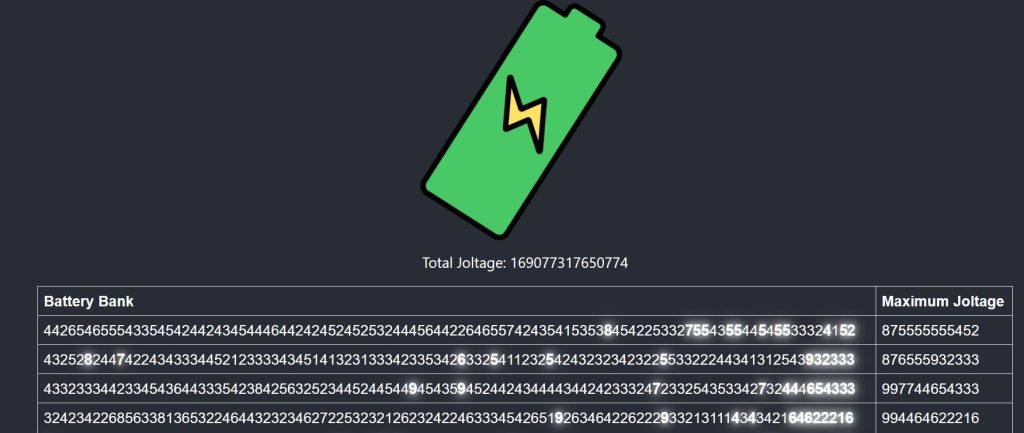
Part 1 is to choose 2 batteries to turn on. The first battery’s number becomes the tens digit of your “joltage” and the second battery becomes the ones digit.
Undoubtedly, you will write something like this:
const getMaximumJoltage = (bank: string) => {
  let maxTensVal = 0;
  let maxTensIndex = 0;
  let maxOnesVal = 0;
  for (let i = 0; i < bank.length - 1; i++) {
    if (Number(bank[i]) > maxTensVal) {
      maxTensIndex = i;
      maxTensVal = Number(bank[i]);
    }
  }
  for (let j = maxTensIndex + 1; j < bank.length; j++) {
    if (Number(bank[j]) > maxOnesVal) {
      maxOnesVal = Number(bank[j]);
    }
  }
  return (maxTensVal * 10) + maxOnesVal;
};
Notice how the ones and tens shit is hardcoded. Part 2 is to do the same, but choose 12batteries to turn on.
Now, this is super unrealistic because we all know that real clients and PM’s never change their minds. Humor me though. If you had written part 1 as:
You would be done. If not, you either need to edit the first function with 20 extra variables and loops, or write the abstraction that you should have written in the first place..
So far so good. Finding invalid id’s (sequences of repeated numbers, eg. 123123) using brute force and awkward string manipulation.
Remembered that “awkward string manipulation” is usually a good flag for regex. Fired up my regex generator (AKA ChatGPT). Boom. Done.
def getInvalidIdSum(rangeBounds, part2Flag):
  invalidIdSum = 0
  for id in range(int(rangeBounds[0]), int(rangeBounds[1]) + 1):
    if (re.fullmatch(r"^(\d+)\1+$" if part2Flag else r"^(.+?)\1$", str(id))):
      invalidIdSum += int(str(id))
  return invalidIdSum
Well it’s that time of year again. I’ll inevitably get really into this thing for a few nights, and then around day 5 or 6, full on ragequit after an exhausting 3 AM troubleshooting session.
My overly ambitious plan is to try to mix in a few different languages/technologies.. I’ve heard of people using a different language every day, but that’s 12 days, or like 10 more languages than I could possibly manage.
Anyway, here is day 1 though, in Excel VBA:
Option Explicit

Function GetNewDialPosition(instruction As String, currentDialPosition As Integer) As Integer
    Dim direction As String
    Dim amount As Long
    Dim rawPosition As Integer 'Can be negative
    Dim actualPosition As Integer 'Always between 0 and 99

    direction = Left(instruction, 1)
    amount = Int(Right(instruction, Len(instruction) - 1))

    If direction = "R" Then
        rawPosition = (currentDialPosition + amount) Mod 100
    Else
        rawPosition = (currentDialPosition - amount) Mod 100
    End If
    If rawPosition < 0 Then
        actualPosition = rawPosition + 100
    Else
        actualPosition = rawPosition
    End If
    GetNewDialPosition = actualPosition
End Function

Function GetPassingZeroes(instruction As String, currentDialPosition As Integer) As Long
    Dim direction As String
    Dim amount As Long
    Dim passingZeroes As Long

    direction = Left(instruction, 1)
    amount = Int(Right(instruction, Len(instruction) - 1))

    If direction = "R" Then
        passingZeroes = Abs(Int((currentDialPosition + amount) / 100))
        If (currentDialPosition + amount) Mod 100 = 0 Then
            passingZeroes = passingZeroes - 1
        End If
    Else
        passingZeroes = Abs(Int((currentDialPosition - amount) / 100)) - Abs(Int(currentDialPosition / 100))
        If currentDialPosition = 0 Then
            passingZeroes = passingZeroes - 1
        End If
    End If
    GetPassingZeroes = passingZeroes
End Function


Sub GetPassword()
    Dim currentRow As Long
    Dim currentDialPosition As Integer
    Dim currentInstruction As String
    Dim lastRow As Long
    Dim numberOfZeroes As Long
    Dim numberOfZeroesPart2 As Long

    currentDialPosition = 50
    numberOfZeroes = 0
    numberOfZeroesPart2 = 0
    lastRow = 4780

    For currentRow = 1 To lastRow
        numberOfZeroesPart2 = numberOfZeroesPart2 + GetPassingZeroes(Cells(currentRow, 1).Value, currentDialPosition)
        currentDialPosition = GetNewDialPosition(Cells(currentRow, 1).Value, currentDialPosition)
        If currentDialPosition = 0 Then
            numberOfZeroes = numberOfZeroes + 1
            numberOfZeroesPart2 = numberOfZeroesPart2 + 1
        End If
    Next

    MsgBox "The password is: " & CStr(numberOfZeroes) & " for part 1 and " & CStr(numberOfZeroesPart2) & " for part 2"
End Sub